

Overview
The GA4 BigQuery export gives Hazel your raw Google Analytics events, one row per event. Use it for questions the standard Google Analytics integration can’t answer, like where shoppers drop off between viewing a product and checking out.What Hazel pulls
Hazel reads the daily events tables (events_YYYYMMDD) in your GA4 dataset. Each row is one event, such as a page view, add to cart, purchase, or custom event, with its parameters, ecommerce items, device, geography, traffic source, and pseudonymous user and session IDs.
How to connect
There are two parts. First you send your GA4 data to BigQuery, then you give Hazel access to read it. What you’ll need:- Editor or Administrator access to your GA4 property
- A Google Cloud project where you can create service accounts and grant roles
Part 1: Send your GA4 data to BigQuery
Already exporting GA4 to BigQuery? Skip to Part 2.1
Open BigQuery links in Google Analytics
In Google Analytics, click Admin at the bottom of the left sidebar. Under Product links, choose BigQuery links, then click Link.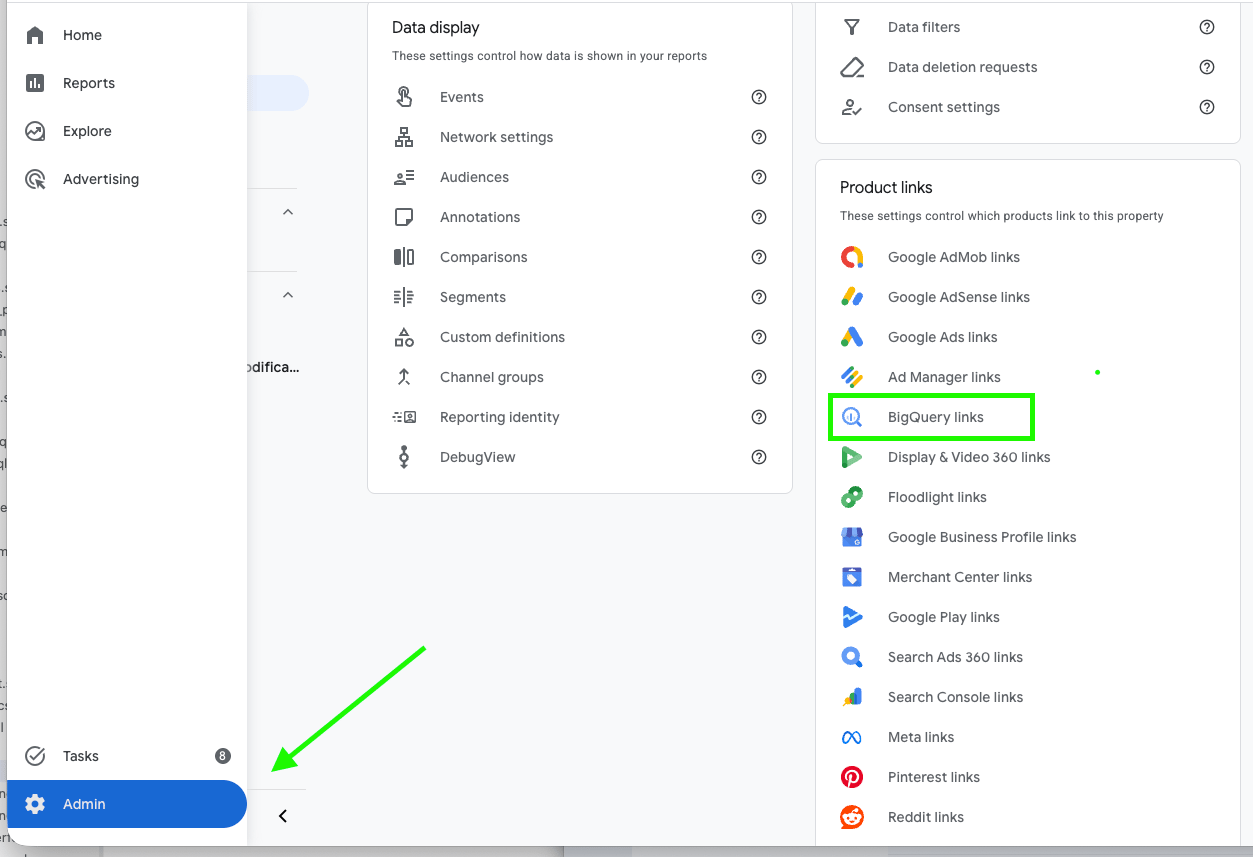
2
Choose your project and turn on daily exports
Pick your Google Cloud project and a data location. If you don’t have a project, create one first from the project picker in the Google Cloud console.Set the export type to Daily for both Event data and User data. Leave Streaming unchecked.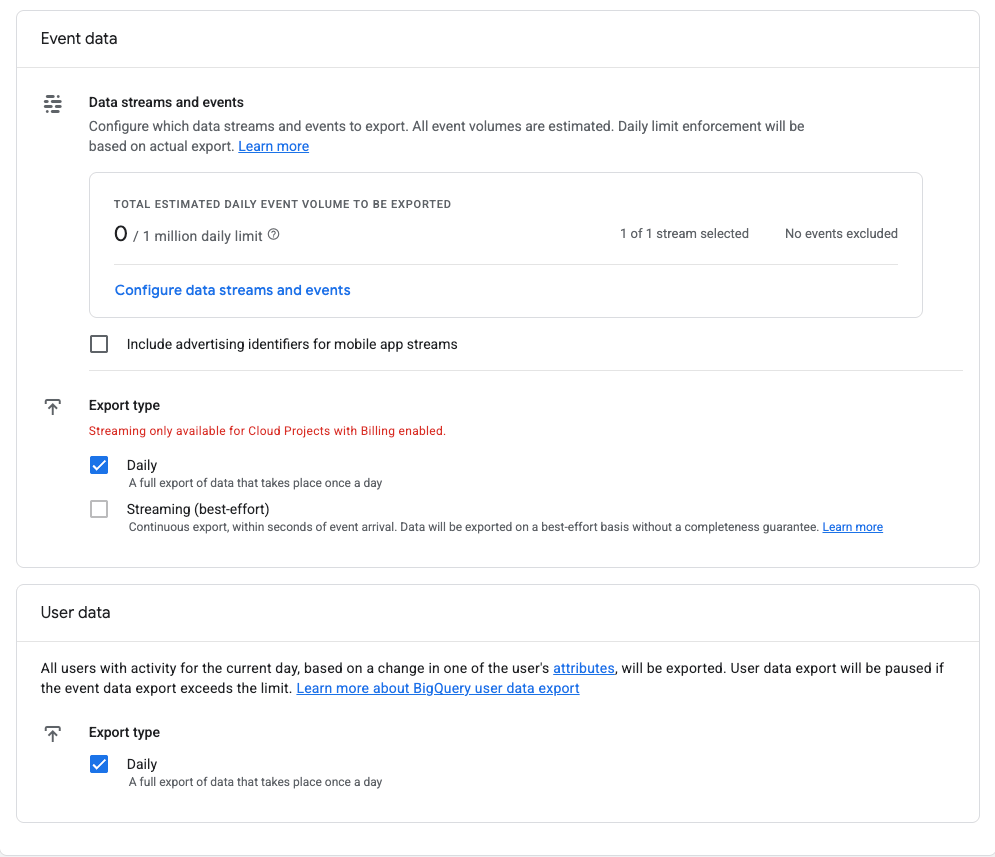
analytics_<property_id> in your project, and the first day of data arrives within about 24 hours. Google’s guide to setting up BigQuery Export has more detail.Part 2: Give Hazel access
Hazel reads your export as a service account, which is a Google login for software. You create it in your project, let it read only your GA4 dataset, and enter its key in Hazel.1
Create a service account and key
In the Google Cloud console, open Service Accounts in the project that holds your GA4 dataset, and click Create service account. Name it something like 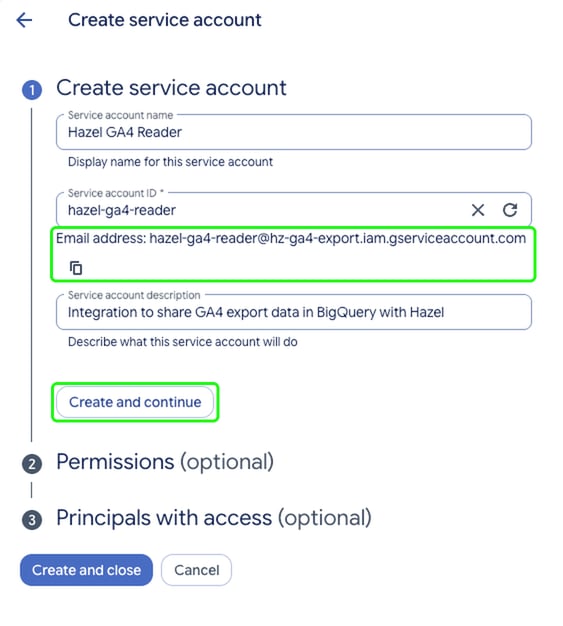
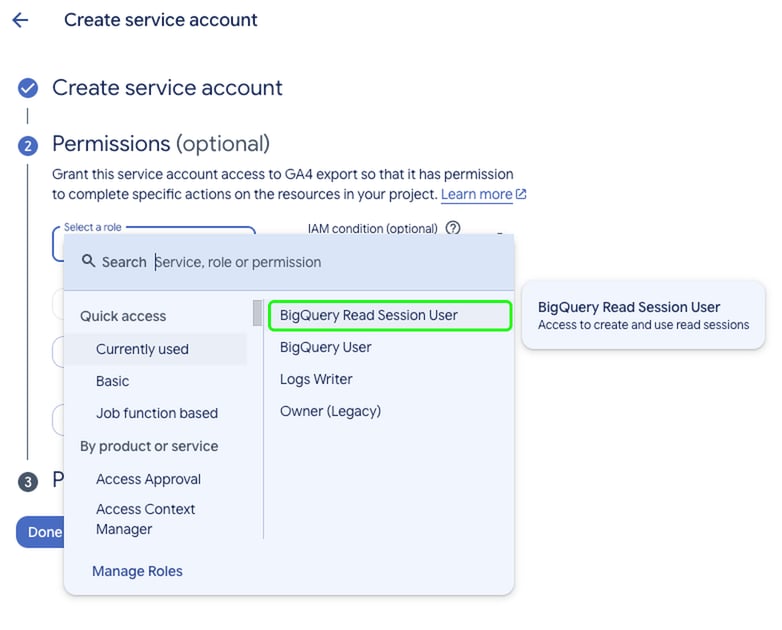
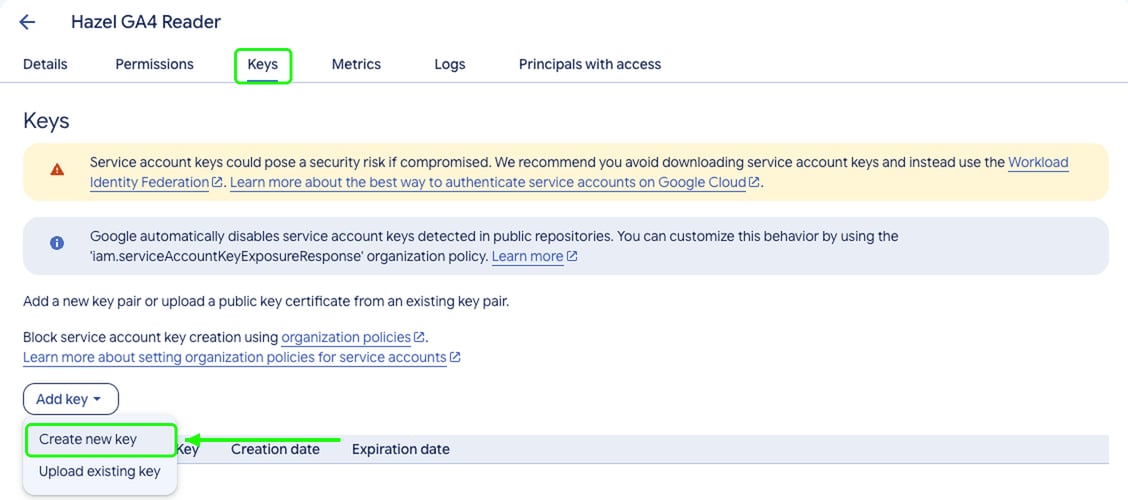
hazel-ga4-reader and copy its email address, which you’ll need to share the dataset. Click Create and continue, not Create and close, so you reach the Permissions step.2
Open your GA4 dataset's permissions
In BigQuery, open your project’s Datasets and click 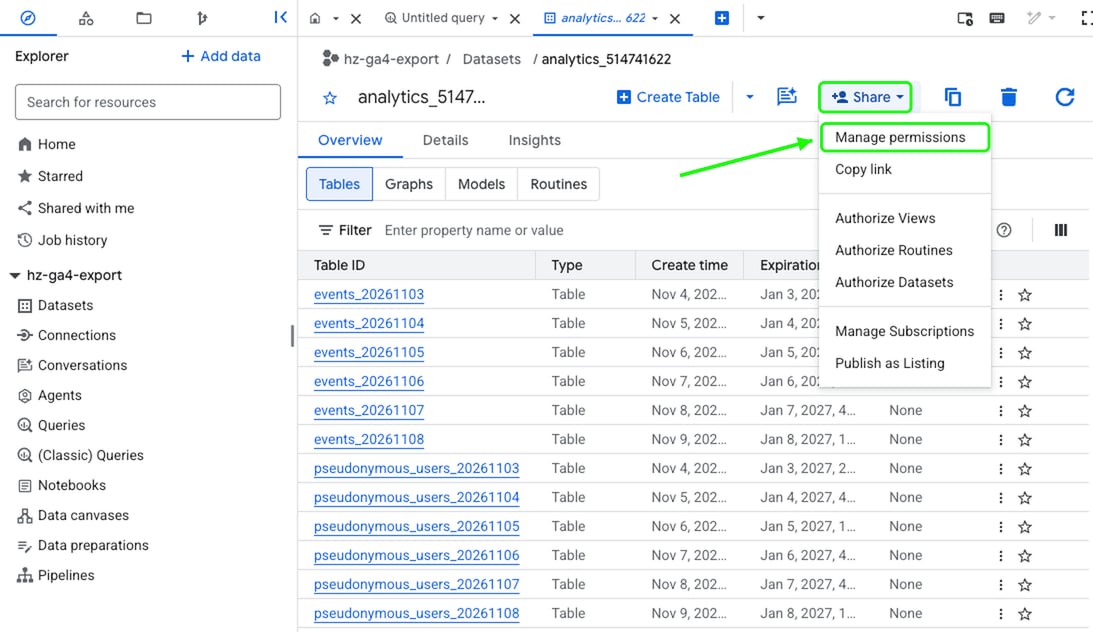
analytics_<property_id>. Click Share, then Manage permissions.3
Add the service account as a Data Viewer
Click Add principal.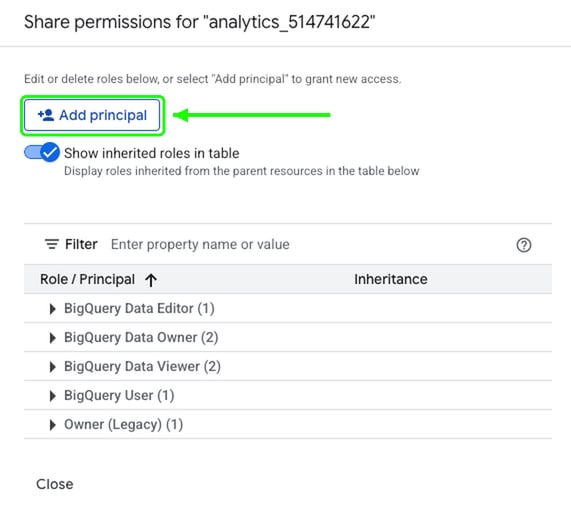
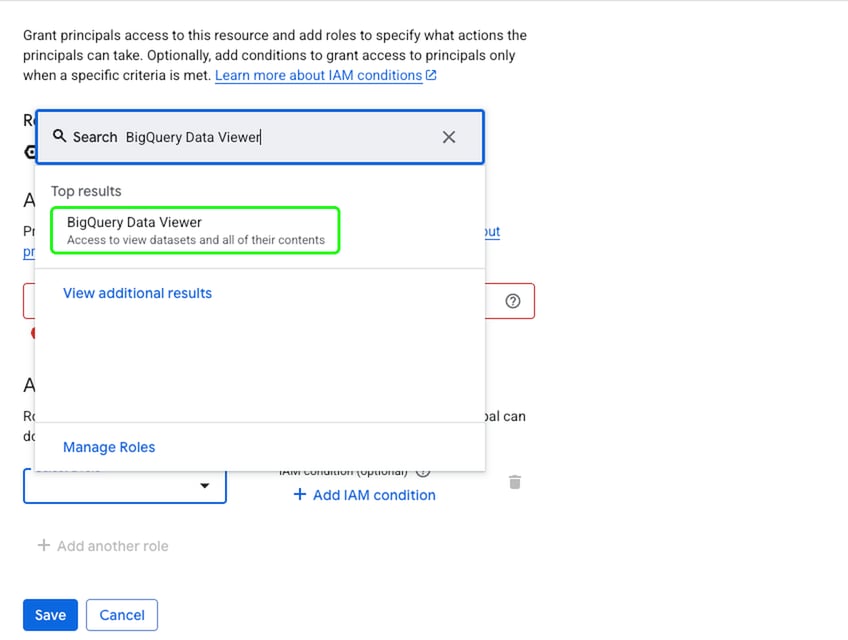
4
Connect in Hazel
Find GA4 BigQuery Export in the Hazel marketplace and click +. You’ll copy two values from your key file:Fill in the form:
- Service Account Email Address: the
client_emailvalue - Scopes:
https://www.googleapis.com/auth/cloud-platform - Private Key: the
private_keyvalue, everything between the quotes, including each\n
5
Send us your dataset ID
In BigQuery, find your project ID and dataset ID.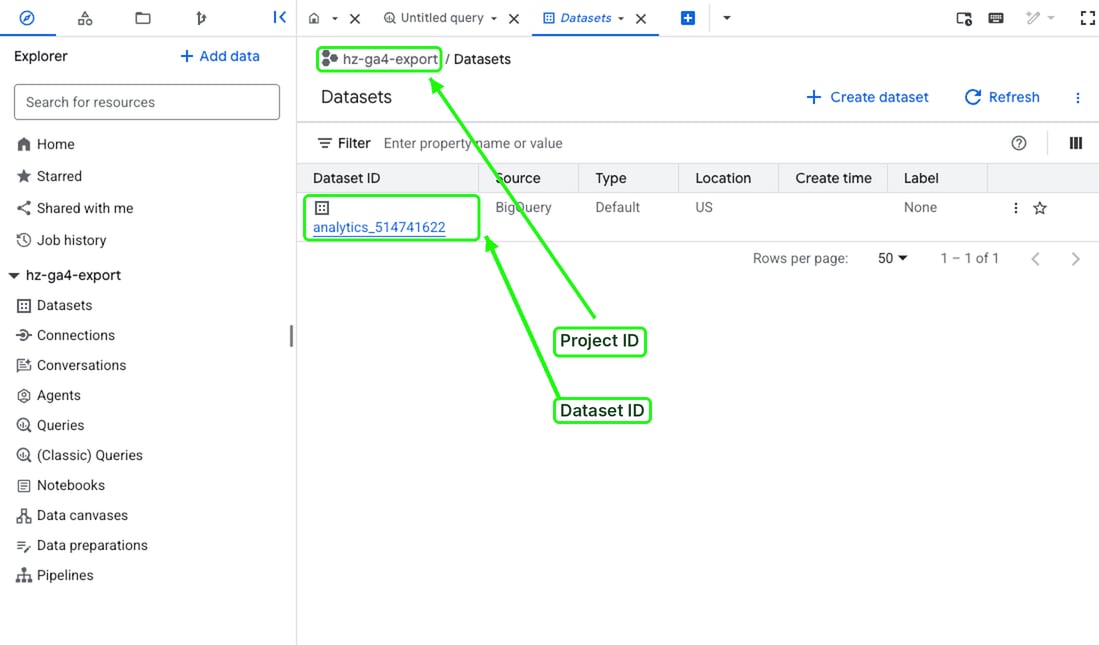
<project_id>.<dataset_id>, for example my-project.analytics_123456789. Hazel starts syncing once we’ve added it to your connection.Example questions you can ask
- “Where do people drop off between product view, add to cart, and checkout this month?”
- “Which products get viewed a lot but rarely added to cart?”
- “What’s the most common path from landing page to purchase?”
- “Do sessions that use site search convert better?”
- “Break down add to cart rate by device and browser”
Good to know
- Google doesn’t backfill the export, so Hazel’s history starts the day you link it. Turn on the User data export now as well. Hazel doesn’t read it yet, but its history can’t be filled in later either.
- Google updates each day’s table for up to three days as late events arrive, and sometimes reprocesses older days. Hazel rereads any day that changes.
- Standard GA4 properties can export up to 1 million events a day. Google emails your GA4 admins when a property goes over, and pauses the daily export if it keeps happening. Missed days aren’t recovered. GA4 360 has a higher limit.
- Reads are billed to your Google Cloud project. Hazel reads each day’s table once, and again only if Google changes it.
- If your organization blocks service account key creation, or your project sits inside VPC Service Controls, your cloud admin will need to make an exception for this service account.
- GA4’s
user_pseudo_idis a browser cookie, so it doesn’t match Shopify customers unless you send your own user ID to GA4.